Simple gun tutorial on how I paint my Nomad's guns.
1. Coat the gun with Vallejo 70.994 Dark Grey
2. Wash the gun with Vallejo wash 76.517 Dark Grey (ha, theme)
3. Go over the gun again with Vallejo's Dark Grey
4. With a 1:1 ratio mix Vallejo Dark Grey with 72.050 Cold Grey. You can use strait cold grey on certain spots to make a more extreme highlight.
Sunday, February 21, 2016
Finished: Guija and Yan Huo
Today I finished taking pictures of my Yan Huo and Guija. Photography is a whole different animal then what I'm use to, but i'm proud of how they came out
I also started a new deviant art page so I can keep a gallery of my painted models in one place. :)
Sunday, February 7, 2016
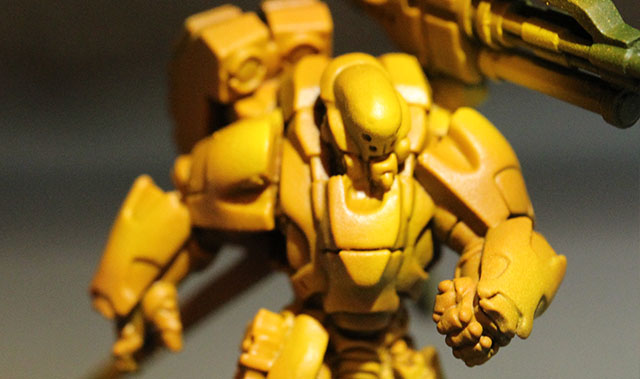
HTP: Yan Huo Orange
The army of the rising sun's most powerful Heavy Infantry is an appropriate orange yellow. Any forces coming at you will know this is the last light they'll ever see as their HMC spins up.
Started priming the model with Vallejo Black Primer 73.602 over the entire model. Followed by priming the model from a 45° angle making sure to leave black in the bottom and shadows.
(I only have one light for my airbrush so the shadows are stronger then they are on the actual model)
Next you'll airbrush the entire model with Vallejo Hot Orange 72.709 covering everything in 3 thin coats.
Spraying from the 45° angle, airbrush the top of all the armor plates you want to be orange/yellow with Vallejo Orange Fire 72.708. This may take a few coats to get a good shaded orange. don't rush.
In very thin layers, add Vallejo Sun Yellow 72.706 to the highest points in the armor.
The effect is more obvious on my Guija, you can see the slight gradient from the orange fire into the sun yellow.
Now the fun part, go ahead and airbrush the highlights with Vallejo Dead White 72.701 it's easier on the tag and looks phenomenal after the next step.
Airbrushing over all the white parts of the model go over it again with Vallejo Sun Yellow 72.706. the tag has more area so the effect is easier to see.
With a wet pallet, I mix Vallejo Sand yellow 70.916 1:1 with water. Go over the edges of the armor with this mixture and highlight your miniature.
I used Minitaire D6-199 Gloss Coat because its the airbrush gloss coat I have. but any thin gloss you can airbrush is fine. I don't recommend brushing the gloss on because it can be too thick.
Allow enough time for the gloss to dry completely, I leave it for at least a few hours. Using Vallejo wash Oxide Rust 76.506 paint the cracks in the model to give additional shading.
Once the wash is completely dry you'll seal the model again with Vallejo Mat Varnish 70.520.
From here the yellow is complete!
Started priming the model with Vallejo Black Primer 73.602 over the entire model. Followed by priming the model from a 45° angle making sure to leave black in the bottom and shadows.
(I only have one light for my airbrush so the shadows are stronger then they are on the actual model)
Next you'll airbrush the entire model with Vallejo Hot Orange 72.709 covering everything in 3 thin coats.
Spraying from the 45° angle, airbrush the top of all the armor plates you want to be orange/yellow with Vallejo Orange Fire 72.708. This may take a few coats to get a good shaded orange. don't rush.
In very thin layers, add Vallejo Sun Yellow 72.706 to the highest points in the armor.
The effect is more obvious on my Guija, you can see the slight gradient from the orange fire into the sun yellow.
Now the fun part, go ahead and airbrush the highlights with Vallejo Dead White 72.701 it's easier on the tag and looks phenomenal after the next step.
Airbrushing over all the white parts of the model go over it again with Vallejo Sun Yellow 72.706. the tag has more area so the effect is easier to see.
With a wet pallet, I mix Vallejo Sand yellow 70.916 1:1 with water. Go over the edges of the armor with this mixture and highlight your miniature.
I used Minitaire D6-199 Gloss Coat because its the airbrush gloss coat I have. but any thin gloss you can airbrush is fine. I don't recommend brushing the gloss on because it can be too thick.
Allow enough time for the gloss to dry completely, I leave it for at least a few hours. Using Vallejo wash Oxide Rust 76.506 paint the cracks in the model to give additional shading.
Once the wash is completely dry you'll seal the model again with Vallejo Mat Varnish 70.520.
From here the yellow is complete!
Sunday, December 13, 2015
HTP: Nomads, start to finish.
Nomads!
These are the colors and techniques I used to paint my Nomads.
1. After assembly, airbrush the entire model with Vallejo Surface Primer 73.605 German Red Brown
2. From the top of the model airbrush with Vallejo model air, 71.003 Scarlet Red . Alternate from directly above to a 45 degree angle making sure to leave the primer visible from the direct front and bottom of the model.
3. I used Minitaire D6-199 Gloss Coat over all the parts that will stay red on the model. Keep in mind when using clear coats that to little is better then to much. try not to spray on areas where you won't be keeping the model red. this will keep another layer from obscuring your detail.
4. Using Vallejo model wash 76.517 Dark Grey, use a fine tip brush and apply the wash into the cracks on the model. The gloss coat will keep the wash in the cracks. If you apply to much wash, or it goes outside the lines, use a clean brush to quickly remove the wash and reapply. DO NOT USE INKS FOR THIS STEP. The matte varnish we use to seal the red will re-wet the inks and they will run. ruining your progress.
6. Paint the weapons, and top of the boots with Vallejo Model Color, 70.950 Black.
7. Using Vallejo Model Color 70.941 Burnt Umber to paint the holsters, straps, and boots on the model. followed by a line highlight of Vallejo Game Color 72.042 Parasite Brown. (I highlighted after washing all burnt umber with GW's nuln oil)
8. Using Citadel Shade, Nuln Oil. Go over all the parts of the model painted up to this point that are not red.
9. Go back over the grey's with the London Grey used before. Making sure to leave black in the creases and folds of the fabric.
10. Using a fine detail brush go back over the straps to highlight with the Parasite Brown.
11. Now to seal the model using Vallejo 70.520 Matt Varnish. make sure you cover any gloss on the faces and hands. trying to paint straight over gloss is a terrible idea.
12. I used a fine detail brush to highlight the reds with Vallejo Game Color 72.009 Hot Orange. applying the mat varnish before this step is important so the highlight will be much easier to apply.
13. Painting Skin I used a very old Reaper color, Rosy Skin. Skin varies so much you can use whatever you'd like.
14. Wash the skin with Citadel's Ogryn Flesh. (Yay for easy steps!)
15. Make sure your Rosy Skin is thinned and go back over the skin. Making sure to leave the wash in the recesses of the face.
16. Highlight to finish the skin with Reapers Rosy Highlight.
17. To start with the glow effect Take P3's Arcane Blue. mix it with water till it's a glaze and paint it over the glowing arm gear or any tecky glowing part of the model.
18. Mix the Arcane Blue 1/1 with White for the mid tone. I went around the edges of the glowing 'bit' to give it a cool effect.
19. using mostly White, mix a tiny amount of Arcane Blue and use the glaze to finish off the center of the glowing bit, and hit the edges of the armor.
there you have it! I'll add more to this article about how to finish the bases with a simple airbrush trick later this week. :)
Subscribe to:
Posts (Atom)